Lab 1: Artemis and Bluetooth
New rule from here down: ((this means cpp gist)) ++this means serial monitor response gist++ {{this means Python gist}} [[this means python repsonse]]
1A
1A.1
Established a successful connection with the Artemis board.
1A.2
Executed the Blink example from File → Examples → 01.Basics. The program uploaded correctly, and the Artemis LED blinked as expected.
1A.3
Ran Example4_Serial from File → Examples → Apollo3. The Artemis correctly received and echoed serial input data.
1A.4
Used Example2_analogRead from File → Examples → Apollo3 to evaluate the onboard temperature sensor. Applying a finger to the board resulted in a noticeable increase in the reported temperature.
1A.5
Executed Example1_MicrophoneOutput from File → Examples → PDM to test microphone functionality. Using a frequency generator, the Artemis accurately recorded the tone.
1A.6
// After ui32LoudestFrequency is computed...
if (ui32LoudestFrequency < 380) {
  Serial.printf("out of range\n");
}
else if (ui32LoudestFrequency < 479) {
  Serial.printf("G4\n");
}
else if (ui32LoudestFrequency < 640) {
  Serial.printf("B4\n");
}
else if (ui32LoudestFrequency < 678) {
  Serial.printf("E5\n");
}
else {
  Serial.printf("out of range\n");
}
This program reads audio from a PDM microphone, runs an FFT to find the dominant frequency, and prints G4, B4, or E5 to the Serial monitor when the peak falls in those ranges (otherwise it prints “out of range”), acting as a simple tuner.
1B
1B.0

I set up a Python environment, installed Jupyter Lab, and added all necessary dependencies and course files. The Jupyter server launched without issues. I flashed ble_arduino.ino onto the Artemis, successfully retrieved its MAC address, and generated a UUID to update the connection.yaml configuration.
1B.1
ble.send_command(CMD.ECHO, "test")
ble.receive_string(ble.uuid['RX_STRING'])['Robot says -> test :)']String data were transmitted from the computer to the Artemis board using the ECHO command. The Artemis board returned an augmented version of the transmitted string, which was received and displayed on the computer.
1B.2
case SEND_THREE_FLOATS:
    /*
     * Your code goes here.
     */
    float float_a, float_b, float_c;

    // Extract the next value from the command string as a float
    success = robot_cmd.get_next_value(float_a);
    if (!success)
        return;

    // Extract the next value from the command string as a float
    success = robot_cmd.get_next_value(float_b);
    if (!success)
        return;

    // Extract the next value from the command string as a float
    success = robot_cmd.get_next_value(float_c);
    if (!success)
        return;

    Serial.print("Three Floats: ");
    Serial.print(float_a);
    Serial.print(", ");
    Serial.print(float_b);
    Serial.print(", ");
    Serial.println(float_c);

break;ble.send_command(CMD.SEND_THREE_FLOATS, "2.1|6.5|0.7")Three Floats: 2.10, 6.50, 0.70Three floating point values were transmitted to the Artemis board using the SEND_THREE_FLOATS command. The Arduino sketch successfully parsed and stored the three float values from the received message.
1B.3
ble.send_command(CMD.GET_TIME_MILLIS, "")
ble.receive_string(ble.uuid['RX_STRING'])['T:6233508'
T:6233508
]A GET_TIME_MILLIS command was implemented to allow the robot to transmit a timestamp string in the format T:<time_in_milliseconds> through the string characteristic.
case GET_TIME_MILLIS:
    tx_estring_value.clear();
    tx_estring_value.append("T:");
    tx_estring_value.append((int)millis());
    tx_characteristic_string.writeValue(tx_estring_value.c_str());
    break;
1B.4
def notification_handler(uuid, byteArray):
    string = ble.bytearray_to_string(byteArray)
print(string)ble.start_notify(ble.uuid['RX_STRING'], notification_handler)A notification handler was implemented in Python to receive string data from the BLE string characteristic on the Artemis board. The callback function extracted and stored the timestamp value from the received string.
1B.5
case GET_TIME_MILLIS_LOOP: {
    unsigned long start = millis();
    int num_readings = 0;
    while ((millis() - start) < 5000) {
        tx_estring_value.clear();
        tx_estring_value.append("T:");
        tx_estring_value.append((int)millis());
        tx_characteristic_string.writeValue(tx_estring_value.c_str());
        num_readings ++;
    }

    delay(1000);
    Serial.println(num_readings);
    tx_estring_value.clear();
    tx_estring_value.append("num readings");
    tx_estring_value.append(num_readings);
    tx_characteristic_string.writeValue(tx_estring_value.c_str());
}
break;ble.send_command(CMD.GET_TIME_MILLIS_LOOP, "")T:4330546
T:4330546
T:4330546
T:4330546
…
T:4335499
T:4335499
T:4335529
T:4335529
num readings268A loop was developed to continuously retrieve the current time in milliseconds on the Artemis board and transmit it to the computer. The received timestamps were recorded over several seconds and used to calculate the effective data transfer rate of the communication method. The transmission rate varied between 203 and 268 messages over a 5-second interval. Since each message contained 8 bytes of data, this corresponds to an average transfer rate of approximately 324 to 428 bytes per second.
1B.6
case SEND_TIME_DATA:
    for(int i = 0; i < array_length; i++){
        time_array[i] = (int) millis();
    }

    for(int i = 0; i < array_length; i++){
        tx_estring_value.clear();
        tx_estring_value.append("T:");
        tx_estring_value.append(time_array[i]);
        tx_characteristic_string.writeValue(tx_estring_value.c_str());
    }

    memset(time_array, 0, sizeof(time_array));
break;ble.send_command(CMD.SEND_TIME_DATA, "")T:4371767
T:4371767
T:4371767
…
T:4371768
T:4371768
T:4371768
T:4371768A global array was created to store timestamp values so that the data could be accessed by multiple functions. Instead of transmitting each timestamp immediately, the loop stored each timestamp in the array. A SEND_TIME_DATA command was implemented to iterate through the array and transmit each stored timestamp as a string to the computer for processing.
1B.7
case GET_TEMP_READINGS:
    for(int i = 0; i < array_length; i++){
        time_array[i] = (int) millis();
        temp_array[i] = (float)getTempDegF();
    }
    for(int i = 0; i < array_length; i++){
        tx_estring_value.clear();
        tx_estring_value.append("Temp:");
        tx_estring_value.append(temp_array[i]);
        tx_estring_value.append(" at time: ");
        tx_estring_value.append(time_array[i]);
        tx_characteristic_string.writeValue(tx_estring_value.c_str());
    }
    memset(time_array, 0, sizeof(time_array));
    memset(temp_array, 0, sizeof(temp_array));

break;ble.send_command(CMD.GET_TEMP_READINGS, "")Temp:69 at time: 4403474
Temp:68 at time: 4403475
Temp:68 at time: 4403475
…
Temp:68 at time: 4403490
Temp:66 at time: 4403491
Temp:68 at time: 4403491A second global array of equal length was created to store temperature measurements. Each temperature value was recorded at the same index as its corresponding timestamp to maintain synchronization between the datasets. A GET_TEMP_READINGS command was implemented to iterate through both arrays simultaneously and transmit paired timestamp and temperature values. The Python notification handler was configured to parse the received strings and store the timestamps and temperature data into separate lists.
1B.8
Comparison of Data Collection Methods Method 1 – Streaming Each Sample Immediately: This method transmits each measurement over BLE as it is recorded, resulting in low latency and minimal onboard memory usage. However, the sampling rate is limited by BLE transmission speed and processing overhead, and dropped connections may result in lost samples. This method is best suited for real-time monitoring and debugging applications. Method 2 – Local Buffering and Batch Transmission: This method stores measurements locally in arrays and transmits them after collection, allowing for faster and more consistent sampling since data collection is not limited by BLE communication speed. The tradeoffs include higher memory usage, increased implementation complexity, and delayed access to collected data. This method is preferred for experiments requiring high sampling rates where real-time feedback is not necessary. Sampling Speed of Method 2: Local buffering can record data significantly faster than BLE streaming, as it is mainly limited by sensor read time and loop execution speed. In the current implementation, 64 samples are collected nearly instantaneously, which may result in repeated timestamps due to the 1 ms resolution of millis(). Memory Capacity Estimate: The Artemis board has 384 kB (393,216 bytes) of RAM. If each sample stores a 4-byte timestamp and a 4-byte temperature value, each sample requires 8 bytes of memory. This allows for a theoretical maximum of approximately 49,152 samples, though the usable capacity is lower due to memory required for BLE and program operation.
1B.9
times_list = []
rates_list = []
sizes_list = []
reply_store = []

for step in range(5, 125, 5):

    payload = "." * step
    data_size = len(payload)
    sizes_list.append(data_size)

    t_start = time.time()

    ble.send_command(CMD.ECHO, payload)
    reply = ble.receive_string(ble.uuid['RX_STRING'])

    t_end = time.time()

    elapsed = t_end - t_start
    times_list.append(elapsed)

    effective_rate = data_size / elapsed
    rates_list.append(effective_rate)

    reply_store.append(reply)

    print("message:", payload)
    print("size:", data_size, "bytes")
    print("time:", elapsed)
    print("effective data rate:", effective_rate)
print()message: .....
size: 5 bytes
time: 0.10319685935974121
effective data rate: 48.45108689374109
message: ..........
size: 10 bytes
time: 0.12408995628356934
effective data rate: 80.5866993550073
…
message: ........................................................................................................................
size: 120 bytes
time: 0.11944985389709473
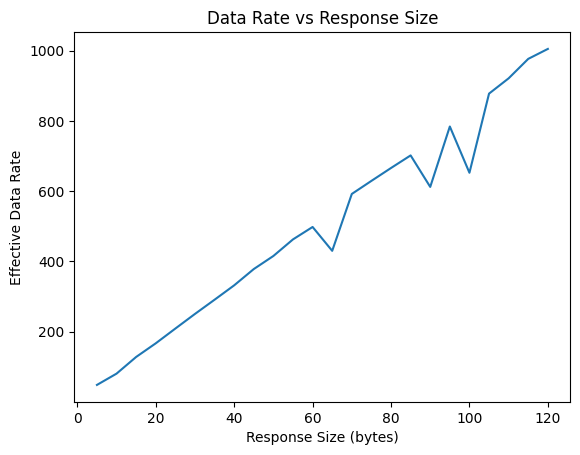
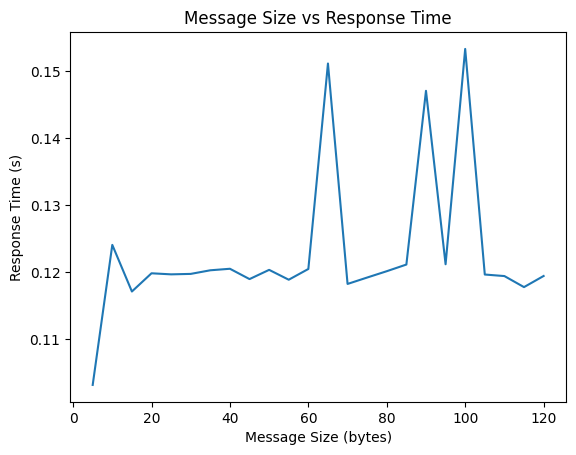
effective data rate: 1004.6056657664832The 5-byte reply took 0.103 s, giving a data rate of 48.45 bytes/s. The 120-byte reply took 0.119 s, giving 1004.61 bytes/s. Since response time stays nearly constant, small packets suffer high overhead and low efficiency. Larger replies reduce overhead and significantly improve data rate, as shown by the increasing trend in the plot.
1B.10
case RELIABILITY: {
    int count;
    success = robot_cmd.get_next_value(count);
    if (!success) return;

    if (count < 0) count = 0;
    Serial.println("Sending packets...");

    for (int i = 0; i < count; i++) {
        tx_estring_value.clear();
        tx_estring_value.append("ID:");
        tx_estring_value.append(i);
        tx_characteristic_string.writeValue(tx_estring_value.c_str());
    }

    break;
}packets_received = set()
def notification_handler(uuid, byte_array):
msg = ble.bytearray_to_string(byte_array).strip()
if msg.startswith("ID:"):
try:
packets_received.add(int(msg[3:]))
except ValueError:
pass
ble.start_notify(ble.uuid['RX_STRING'], notification_handler)
total_packets = 1000
packets_received.clear()
ble.send_command(CMD.RELIABILITY, total_packets)
time.sleep(30)
try:
msg = ble.receive_string(ble.uuid['RX_STRING']).strip()
print("final read:", msg)
except Exception as e:
print("final read failed:", e)
missing_packets = [i for i in range(total_packets) if i not in packets_received]
packet_loss_percent = 100.0 * len(missing_packets) / total_packets
print("Total Packets Sent:", total_packets)
print("Packets Received:", len(packets_received))
print("Packets Missing:", len(missing_packets))
print("Packet Loss (%):", packet_loss_percent)
ble.stop_notify(ble.uuid['RX_STRING'])final read: ID:999
Total Packets Sent: 1000
Packets Received: 1000
Packets Missing: 0
Packet Loss (%): 0.0As seen by the 100% data capture, the Artemis did not have an issue with data capture at higher speeds.
Discussion
This lab introduced me to programming and interfacing with the Artemis board while establishing Bluetooth Low Energy (BLE) communication with a computer. I learned how structured command handling enables reliable data exchange and how wireless communication can be used for robot debugging and sensor data collection.
A major takeaway was understanding the tradeoff between real-time BLE streaming and locally buffered data collection. Streaming provides immediate feedback but limits sampling speed, while buffering allows faster sampling at the cost of memory usage and delayed transmission.
A challenge in this lab was learning how to properly set up, program, and debug the Artemis board while integrating it with the BLE framework. Working through code uploading, configuration setup, and command implementation helped me become more comfortable with the hardware and development workflow, which will be important for future robot implementation and testing.